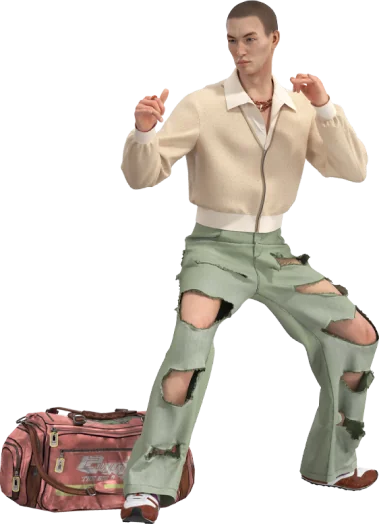
As of Q1 2026, McKinsey reports that global e-commerce fashion sales hit $1 trillion, with 3D try-on adoption surging 45% year-over-year. Digital fashion models are now used by leading brands to create photorealistic human figures that showcase clothing without physical prototypes. The key to convincing results lies not in the avatar itself, but in how accurately the clothing simulates on that avatar.
Understanding the Foundation: Physics-Based Cloth Simulation
Creating hyper-realistic digital humans starts with understanding that fabric simulation is physics, not just rendering. When a pattern maker imports a DXF file into Style3D Atelier, the software immediately begins calculating how that garment will behave under gravity, tension, and collision forces. The first friction point is typically getting the fabric physical properties calibrated correctly.
The simulation engine uses three core parameters: weight (GSM), stretch (warp and weft elasticity), and bending stiffness. For an interlock knit, these values differ substantially from sateen or ponte romba. Get them wrong, and the digital fabric looks like plastic draped over the mannequin rather than real textile. SOHO FASHION, a publicly listed Chinese textile company with over four decades in apparel business, built an internal library of 12,918 fabric pieces and 3,959 3D silhouettes through Style3D. These assets form the foundation for AI and 3D applications across their workflow.
Raytraced rendering adds the final layer of realism. Lighting, shadows, and material properties like sheen or subsurface scattering make the difference between a convincing product image and one that looks obviously synthetic. The tradeoff is real: higher fidelity requires more computational power and longer render times.
The Workflow: From Pattern to Photorealistic Render
The typical workflow in Style3D Atelier follows six stages. Stage one involves importing patterns—either from DXF files or drafted directly within the software. Stage two stitches these patterns together virtually, checking seam alignment and ease. Stage three dresses the avatar, placing the garment on a 3D human model with accurate body proportions.
Stage four is simulation. You set gravity, wind, or pose parameters, then run the physics engine. The garment settles onto the avatar, creating natural folds, wrinkles, and stretch patterns. Stage five adjusts fabric properties if the drape looks unrealistic. Stage six is rendering, where you apply materials, lighting, and camera settings for the final output.
SOHO FASHION’s digital designer Zhang Li describes using AI to generate multiple pattern options aligned with client preferences, then applying these designs to silhouettes that match the brand’s aesthetic. Designers focus on refinement using 3D tools, achieving both speed and accuracy. Yang Yi from their R&D Innovation Division notes that without 3D, their efficiency would drop dramatically.
Category-Specific Nuances: What Differs Between Apparel Types
Lingerie underwire simulation differs from outerwear in critical ways. The physics of stretch fabrics, the behavior of underwire channels, and the precision required for fit validation create different technical requirements. Performance knits require specific calibration for moisture-wicking interlock constructions. When simulating a performance pique for golf polos, the physical property settings differ from ponte romba or melange wool used in base layers.
For menswear like OLYMP’s tailored shirts, woven constructions behave differently than stretch knits. The fabric doesn’t recover from deformation the same way, requiring different simulation parameters. Haute couture pieces like NextCouture’s designs demand even higher fidelity, where every pleat and seam detail must be visible and accurate.
Digital designer workflows change based on category. SOHO FASHION most designers have embedded 3D techniques directly into their daily workflow. Their sales representative Sheng Hejin shared that after introducing 3D technology, customer loyalty has largely improved due to the significant reduction of development costs and faster, more responsive collaboration.
Honest Limitations: Where Current Technology Falls Short
Let’s be honest about where the technology still falls short. Fabric drape simulation accuracy for performance knits remains problematic. Getting the moisture-wicking interlock to drape correctly requires different physical property settings than standard cotton pique, and that calibration takes time and real swatch validation. The learning curve for traditional pattern makers who have worked with paper patterns for 20 years is steep — it’s not just learning new software, it’s rethinking the entire workflow.
Hardware requirements can be prohibitive for smaller studios. Real-time fabric simulation with raytraced rendering is computationally expensive. Integration friction with legacy PLM systems is real — successful rollouts more often begin as a parallel sampling pipeline rather than replacing the entire PLM stack immediately.
Resolution, lighting, and other variables can greatly affect results. Optimizing 3D models for real-time use requires mesh and texture compression that actively works against the objective of creating anything close to photorealistic accuracy. The tradeoff between rendering speed and fabric realism is something every team must navigate based on their specific workflow stage.
The Counter-Consensus Reality About Simulation Quality
The common claim that photorealistic rendering requires完全不同的 software stacks is not supported by industry evidence. McKinsey’s State of Fashion 2026 report shows that brands achieving the fastest results didn’t use separate tools for simulation and rendering — they integrated both within a single platform like Style3D Atelier. Successful implementations use unified workflows where the same geometry serves both real-time preview and final render output.
This approach reduces risk and allows teams to build confidence gradually. When a design team can iterate multiple colorways in minutes rather than waiting weeks for lab dips, the value becomes obvious without requiring enterprise-wide transformation upfront. SOHO FASHION’s order volumes nearly doubled after introducing 3D modeling support, with most designers now embedding these techniques directly into daily workflows.
The technology serves the workflow, not the other way around. Yang Yi explained that AI delivers two core benefits: speed and accuracy, creating deeper alignment between suppliers and brands by reducing communication costs and improving decision-making efficiency.
Mastering the Details: Expert Tips for Realistic Results
Start with accurate input data. Your patterns must match real-world dimensions. If your DXF file has incorrect seam allowances or grainline orientation, the simulation will never look right. Validate fabric properties against physical swatches before trusting the simulation. Measure GSM, stretch percentage, and bending stiffness using standardized tests.
Lighting matters more than most users realize. A three-point lighting setup with key light, fill light, and rim light produces more dimensional results than flat frontal lighting. Position your camera at eye level or slightly above for flattering garment presentation. Use HDRI environments for realistic reflections on shiny fabrics like sateen or scuba.
Body proportion accuracy is critical. An avatar with incorrect torso-to-leg ratio will make even perfectly simulated garments look wrong. Use industry-standard sizing charts or actual body scan data. SOHO FASHION built their digital asset library specifically to enable structured management and rapid circulation of fabrics, patterns, and samples across their organization.
Frequently Asked Questions
What hardware is required to run Style3D Atelier for clothing simulation?
Style3D Atelier runs on standard workstation hardware with a dedicated GPU (minimum 4GB VRAM), 16GB RAM, and a multi-core processor. For raytraced rendering of complex garments, higher-end GPUs with 8GB+ VRAM and 32GB+ RAM produce better results. Cloud rendering options are available for teams without high-end local hardware.
How long does it take to learn clothing simulation in Style3D Atelier?
For designers with 2D pattern-making experience, the learning curve is approximately 2-4 weeks for basic proficiency. SOHO FASHION reports that most designers embedded 3D techniques into daily workflows within months. Advanced simulation and rendering techniques require 3-6 months of regular use. Traditional pattern makers may need 6-12 months due to the workflow shift from paper to digital.
Can Style3D Atelier export assets for use in other software like Blender or Unreal Engine?
Yes, Style3D Atelier supports export to multiple formats including OBJ, FBX, and glTF for use in Blender, Unreal Engine, Unity, and other 3D applications. Garment geometry, UV maps, and texture maps export intact. Some users enhance materials and add embellishments using geometry nodes in Blender after export.
What makes digital fashion models look photorealistic versus obviously synthetic?
Photorealism comes from accurate fabric physics, proper lighting, and realistic body proportions. The simulation must show natural drape, wrinkles, and stretch patterns based on actual fabric properties. Raytraced rendering with HDRI environments produces convincing reflections and shadows. Subsurface scattering for skin and accurate material properties for textiles close the gap between digital and photographic.
How does 3D clothing simulation reduce physical sampling costs?
Digital sampling replaces 93% of physical samples per Deloitte insights. SOHO FASHION experienced significant development cost reduction after introducing 3D technology. Brands typically reduce sample counts from 5-10 physical iterations to 2-3 virtual rounds before requesting final physical samples for TOP validation.
What’s the difference between real-time preview and final rendered output in Style3D Atelier?
Real-time preview uses simplified shading and lower-resolution textures for interactive manipulation during design. Final rendered output applies full raytracing, high-resolution textures, and advanced material properties for photorealistic results. The tradeoff is computation time: previews render in milliseconds while final outputs may take minutes to hours depending on scene complexity.
