Powering smarter production, from design to delivery.
Style3D Studio V9.2 introduces a refined set of upgrades across modeling, marker making, review workflows, and AI algorithms—designed to support faster, more precise production. With smarter controls, smoother revisions, and enhanced visual realism, V9.2 helps teams work more efficiently and bring designs to production with greater confidence.
To take a closer look at what’s new in Style3D Studio V9.2, join our New Feature Live Webinar, where our Senior Tech Consultant Lucie Knights will showcase key updates, demonstrate real-world workflows, and share how these enhancements power smarter production in practice.
📅 February 11 | 📺 LinkedIn Live | ⏰ 2 PM GMT / 9 AM EST
👉 Click Here to register the webinar and watch live!
1. Connect Production Smarter
1.1 Controlled Rotation in Marker
Precisely control pattern rotation angles to improve marker efficiency.
1.2 Support Pattern Layer Setting in Marker
Set and manage pattern layers freely for more flexible marker layouts.
1.3 Marker Length and Spacing For Super Marker
Adjust marker length and spacing to fit different cutting table requirements.
1.4 Edit Button Quantity by Size
Adjust button quantities by size with flexible configuration, without limitations.
2. Model Faster in 3D
2.1 Weaving Editor
Enables precise editing and realistic restoration of woven materials.
2.2 Multiple Graphic Alignment
Align and snap graphics quickly for cleaner, more accurate layouts.
2.3 One Step Deletion of Vertical Internal Lines
Remove multiple vertical internal lines in one click for faster, more efficient editing.
2.4 Blend Normal Map
Supports blended normal maps to accurately present complex material details.
2.5 Resource Library – Favorites & Folder Renaming
Favorite frequently used resources and rename folders for faster, more efficient access.
3. Review & Revise with Ease
3.1 Enhanced Two-Point Measurement
Read XY values directly from two-point measurements for higher accuracy.
3.2 Dart Point Extension
Flexibly adjust dart point extensions for finer control of dart details.
3.3 Review 2D Points in 3D
Add points and preview changes in real time within the 3D view.
3.4 Overlapping Segment Point Merging
Edit and merge overlapping segment points to simplify pattern modifications.
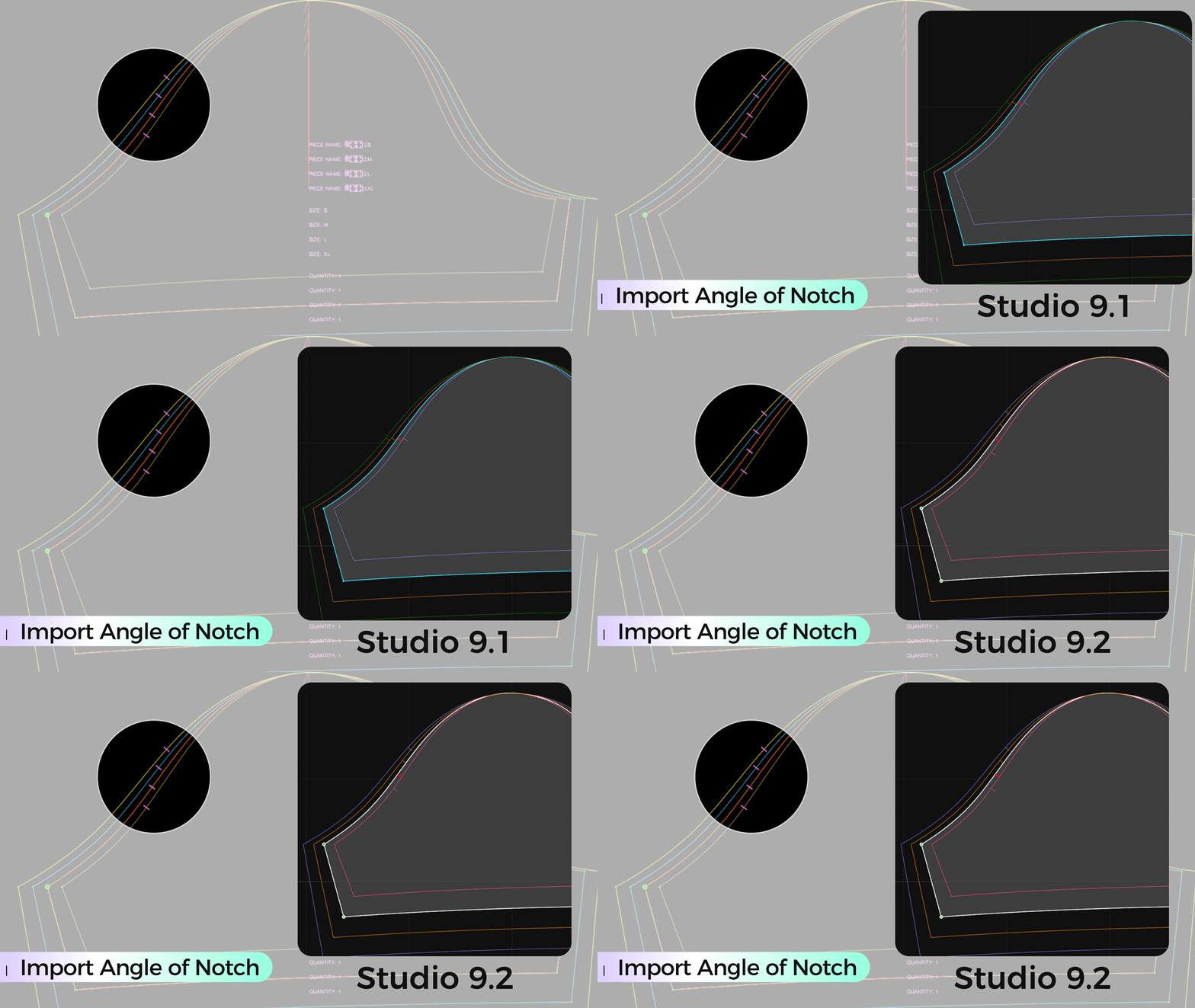
3.5 Import Angle of Notch
Import notch angles at fixed distances to ensure precise alignment and accurate cutting.
4. AI Upgraded
4.1 HQ1.0 AI Algorithm Model
Upgraded AI algorithm model enhances fabric texture and scene realism for more natural, high-quality outputs.
Curious to see more details about how the latest updates in Style3D Studio V9.2 work together in practice?
Join our New Feature Live Webinar on February 11, streaming via LinkedIn Live at 2 PM GMT / 9 AM EST, and take a closer look at how these enhancements support smarter, more efficient production—from design to delivery.
Click Here to learn more and watch live!